Homework Exercises
CSCI 127: Introduction to Computer Science
Hunter College, City University of New York
Spring 2026
All students registered by Friday, January 23, are sent a Gradescope registration invitation to the email on record on their Brightspace account. If you did not receive the email or would like to use a different account, fill in the form on Brightspace. Include that you not receive a Gradescope invitation, your preferred email, and your EmpID. We will manually generate an invitation. As a default, we use your name as it appears in Brightspace/CUNYFirst (to update CUNYFirst, see changing your personal information). If you prefer a different name for Gradescope, include it, and we will update the Gradescope registration.
General Notes
Learning programming is like learning a foreign language: you will learn more (with less work) if you practice every day. Some of the programs below are easy; some will take more time. We suggest you set aside a block of time most days to work on programming and the course.
The programs build on the concepts and code developed during lecture, lab, and through the reading. Mastery of material is assessed via
- Autograding of the programs submitted to Gradescope,
- The weekly written quizzes with questions about the programs you wrote and concepts from lecture and lab,
- The oral code reviews where, each week, you code a program in IDLE, and
- The paper final exam which covers all material from the semester.
Autograder Notes
The majority of the programs this semester are written in Python (see Lab 1 for getting started with Python); it is noted below when other formats or languages are used. For Python programs, the autograder expects a .py file, using only the specified libraries, and does not accept iPython/Jupyter notebooks. Since all assignments are designed to be uploaded as a single file, the autograder is set up for direct file upload instead of Github. If submitting directly (drop-and-drag onto the webpage), the file name is flexible but must have the extension .py, unless otherwise noted.
Also, to receive full credit, the code should be compatible with Python 3.10 (the default for the Gradescope autograders).
To get full credit for a program, the file must include in the opening comment:
- Your name, as it appears in your Gradescope registration.
- The email you are using for Gradescope.
For example, for the student, Thomas Hunter, his first program might be:
"""
Name:  Thomas Hunter
Email: thomas.hunter1870@hunter.cuny.edu
Date: September 1, 2025
This program prints: Hello, Thomas Hunter
"""

print("Hello, Thomas Hunter")
For each program, the upper right hand side of the description contains the due date, suggested reading, and, when applicable, the available libraries. When testing your Python programs, the autograder uses Python 3.10 and has available the libraries listed. If the available libraries is none, no additional libraries are used (e.g. no import statement is needed in your program).
You may submit your assignments up to three weeks before the due date and are encouraged to work ahead. To receive credit, assignments must be submitted by the deadline to Gradescope. For more information on using Gradescope, see Lab 1. Since Gradescope gives limited feedback, run your program first locally (on your computer or a lab computer) where the compiler messages will pinpoint errors and help debug your code. For example, if Gradescope gives you a "The autograder failed to execute..." error, it means your program has an error (in this case, it's usually the file contains non-Python commands.). The local Python compiler will give the line of your file with the error, where Gradescope will only say that there's a general problem. For more information on installing Python on your computer, see the installation guides.
Homework Exercises
-
Due Date: 5pm, Friday, January 30
Reading: Chapter 1 & Lab 1
Available Libraries: noneHello
Write a program that prints
Hellofollowed by your name to the screen. For example, if your name isThomas Hunter, when your program is run, it would print:Hello, Thomas Hunter
-
Due Date: 5pm, Monday, February 2
Reading: Chapter 4 & Lab 1
Available Libraries: turtleTriangle
Write a program that draws a triangle using the
turtlelibrary.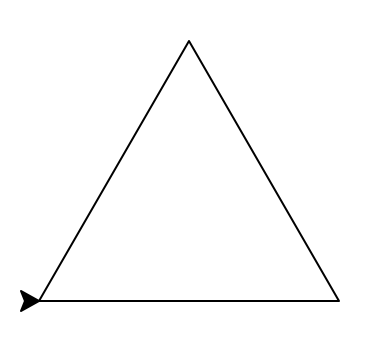
Note: Whenever submitting a turtle program, choose a name for your file that is not turtle.py. When executing theimport turtlestatement, the computer first looks in the folder where the file is saved for the turtle module and then in the libraries (and other places on the path). If you name your file turtle.py, it thinks the module is itself, causing all kinds of errors. To avoid this, name your program something like myTurtle.py or program2.py. -
Due Date: 5pm, Wednesday, February 4
Reading: Chapter 4 & Lab 1
Available Libraries: turtleTurtle Drawing
Write a program to draw your dream home using turtles. The initial part of the code is provided. This must be your own design and, as with all programs, you must be the author of your own code and do your own typing.
You can let your imagination free, the only requirements are:- you must use at least 3 different colors
- your turtle must walk at least 500 steps
"""
Your Name
Your Email
"""
import turtle

t = turtle.Turtle()
t.hideturtle() # Hide the turtle

"""
TODO: finish the rest of the program to draw your dream home
Requirements:  Use at least 3 different colors and walk at least 500 steps
"""
Note: For testing purposes we support the following subset of turtle commands
Please use ONLY these commands in your programs.backward, color, colormode, forward, goto, hideturtle, home, left, pendown, penup, pensize, right, shape, showturtle, speed, stamp
-
Due Date: 5pm, Thursday, February 5
Reading: Chapter 1 & Lab 1
Available Libraries: noneMultiple Greetings
Write a program that will print Welcome! multiple times. The number of times depends on your EmplID number. Take the last 2 digits of your EmplID number and add 10. For example, if your EmplID ends in 13, the number of times you repeat the message is 13+10 = 23.
For example, with an EmplID ending in 02, you would repeat the message 12 times:
Welcome!
Welcome!
Welcome!
Welcome!
Welcome!
Welcome!
Welcome!
Welcome!
Welcome!
Welcome!
Welcome!
Welcome!
-
Due Date: 5pm, Friday, February 6
Reading: Chapter 4 & Lab 1
Available Libraries: turtleFlower
Write a program that implements the pseudocode ("informal high-level description of the operating principle of a computer program or other algorithm") below:
"""
Your Name
Your Email
"""
import turtle

t = turtle.Turtle()
t.speed(0)     # Set the turtle's speed to 0 (fastest)
t.pensize(2)   # Set the turtle's pen size to 2
t.hideturtle() # Hide the turtle

"""
TODO: implement the following pseudocode:
Repeat 36 times:
  Repeat 3 times:
    Change the color to pink.
    Walk forward 80 steps.
    Turn right 60 degrees.
    Change the color to red.
    Walk forward 80 steps.
    Turn right 60 degrees.
  Turn right 10 degrees.
"""
Your output should look like this:

-
Due Date: 5pm, Monday, February 9
Reading: Chapter 2 & Lab 2
Available Libraries: noneUpper & Lower
Using the string commands introduced in Lab 2, write a Python program that prompts the user for a message, and then prints the message, the message in lower case letters, and the message in upper case letters.
A sample run of your program should look like:
Enter a message:  Mihi cura futuri
Mihi cura futuri
mihi cura futuri
MIHI CURA FUTURI
Another run:
Enter a message:  I love Python!
I love Python!
i love python!
I LOVE PYTHON!
Hint: Your program should be able to take any phrase the user enters and prints it, prints it in lower case letters, and prints it in upper case letters. To do that, you need to store the phrase in a variable and print variations of the stored variable. See "More Useful String Methods" in Lab 2.
-
Due Date: 5pm, Wednesday, February 11
Reading: Chapter 2 & Lab 2
Available Libraries: noneLowercase ASCII
Write a program that prompts the user to enter a phrase, converts the phrase to lowercase, and then prints out each lowercase character and its corresponding ASCII code.
A sample run of your program should look like:
Enter a phrase: abc
a 97
b 98
c 99
And another sample run:
Enter a phrase: ABC
a 97
b 98
c 99
Another run, with a longer phrase:
Enter a phrase:  I love Python!
i 105
  32
l 108
o 111
v 118
e 101
  32
p 112
y 121
t 116
h 104
o 111
n 110
! 33
Hint: The first step is to ask the user for input (see Section 2 of Lab 2). If c is a character,
ord(c)returns its ASCII code. For example, if c is 'i', thenord(c)returns 105. See Lab 2 for more on ASCII and characters. -
Due Date: 5pm, Friday, February 13
Reading: Chapter 4 & Lab 2
Available Libraries: turtleExpanding Star-burst
Write a program, using the turtle library, that implements the pseudocode below:
Set the speed to 0.
Set the pen size to 3.
Hide the turtle.

For i = 20, 22, ..., 114:
  Change the color to "cyan"
  Walk forward i steps
  Turn left 60 degrees
  Change the color to "blue"
  Walk forward i steps
  Turn right 120 degrees
Your output should look similar to:

Hint: Use
range()with a step parameter to generate every other number. See examples ofrange(start,stop,step)in Section 4 of Lab 2.
-
Due Date: 5pm, Wednesday, February 18
Reading: Chapter 2 & Lab 2
Available Libraries: noneAcronyms
Write a program that prompts the user for a phrase and creates an acronym, consisting of the first letters of each word, in uppercase.
To approach a problem, it is useful to break it into steps:
- Prompt for a phrase & read it into a variable.
- Make the phrase upper case.
- Print the phrase.
- Split up the phrase into words.
- Take the first letter of each word (keep in mind that split() returns a list of the words ), concatenate and make an acronym of it.
- Print the acronym.
Now translate the above pseudocode (informal but detailed description of the steps in a program) into python and test that your program works as follows:
Enter a phrase:  City University New York
Your phrase in capital letters:  CITY UNIVERSITY NEW YORK
Acronym:  CUNY
And another run:
Enter a phrase:  Hunter College
Your phrase in capital letters:  HUNTER COLLEGE
Acronym:  HC
Hint: See examples of looping through strings in Section 4 of Lab 2.
-
Due Date: 5pm, Thursday, February 19
Reading: Chapter 4 & Lab 3
Available Libraries: turtleShades of Pink
Modify the program from Lab 3 to show the shades of pink.
Hint: think about which combined pair in (red, green, blue) might give you the color pink.Your output should look similar to:

-
Due Date: 5pm, Friday, February 20
Reading: Chapter 2 & Lab 2
Available Libraries: noneWord Count
Write a program that asks the user for a phrase, and prints out the number of words in the phrase. Your program should repeat this for 4 more phrases (a total of 5 phrases):
The output of your program should be:
Enter phrase: This is my letter to the World
7
Enter phrase: That never wrote to Me-
5
Enter phrase: The simple News that Nature told-
6
Enter phrase: With tender Majesty
3
Enter phrase: Emily Dickinson
2
-
Due Date: 5pm, Monday, February 23
Reading: Chapter 2 & Lab 2
Available Libraries: noneEvery 3rd Word Challenge
Write a program that:
- Prompts the user to enter a sentence
- Splits the input into individual words
- Prints every 3rd word from the input, starting with the first word (at index 0)
- Each selected word should be printed on its own line
A sample run of your program should be:
Enter a sentence: The crafty clever Python slithers through code hunting for bugs hiding in nested loops
The
Python
code
bugs
nested
Hint: Use
split()to break the string into a list of words, then userange()with a step parameter to access every 3rd element andlen()to get the length of the list as stop parameter. See examples ofrange(start,stop,step)in Section 4 of Lab 2.
-
Due Date: 5pm, Wednesday, February 25
Reading: Chapter 2, Chapter 4 & Lab 3
Available Libraries: turtleColor Stamps
Write a program that asks the user for a color in hexadecimal notation, moves a turtle forward 20 steps, and then stamps out a turtle shape that color. Your program should repeat this for 4 more colors in hexadecimal notation (a total of 5 turtle stamps and moves forward).
For example, if you ran your program and the user entered:
Enter color (as hex): #0000FF
Enter color (as hex): #0000B8
Enter color (as hex): #000087
Enter color (as hex): #000043
Enter color (as hex): #000011
The output would be:

-
Due Date: 5pm, Thursday, February 26
Reading: Section 2.8, Chapter 4, Lab 2 & Lab 4
Available Libraries: turtleTurning Turtle
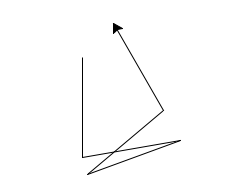
Write a program that asks the user for 5 whole (integer) numbers. For each number, turn the turtle left the degrees entered and then the turtle should move forward 100.
A sample run of your program should look like:
Enter a number: 270
Enter a number: 100
Enter a number: 190
Enter a number: 200
Enter a number: 80
and the output should look similar to:
-
Due Date: 5pm, Friday, February 27
Reading: Lecture 2 & Chapter 2
Available Libraries: noneCaesar Cipher
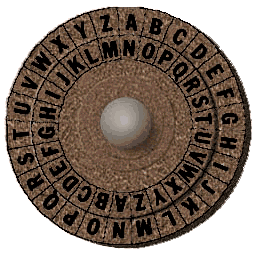
(The cipher disk above shifts 'A' to 'N', 'B' to 'O', ... 'Z' to 'M', or a shift of 13. From secretcodebreaker.com)Write a program that prompts the user to enter a word and the amount to shift, and then prints out the word with each letter shifted right by that amount. For example, if the shift was 13 (as in the figure above), then, 'a' becomes 'n', 'b' becomes 'o', ... 'y' becomes 'l', and 'z' becomes 'm'.
Assume that all inputted words are in lower case letters: 'a',...,'z'.
A sample run of your program should look like:
Enter an all-small-letter string: zebra
Enter a non-negative int to shift: 13
Encoded string: mroen
Here is another sample run of your program.
Enter an all-small-letter string: owqfka
Enter a non-negative int to shift: 6
Encoded string: ucwlqg
Hint: See the example programs from Lecture 2.
-
Due Date: 5pm, Monday, March 2
Reading: Lecture 3, Section 9.7 & Lab 2
Available Libraries: noneSlicing Loop
Implement the following piece of pseudocode as a complete program:1. Prompt the user to enter a string and call it s. 2. Let ls be the length of s. 3. For i in 0, 1, ..., ls-1: 4. Print s[:i] 5. For i in 0, 1, ..., ls-1: 6. Print s[i:] 5. Print a closing statement
A sample run of your program should look like:
Enter string: a man a plan a canal panamawhich would output:
a
a
a m
a ma
a man
a man
a man a
a man a
a man a p
a man a pl
a man a pla
a man a plan
a man a plan
a man a plan a
a man a plan a
a man a plan a c
a man a plan a ca
a man a plan a can
a man a plan a cana
a man a plan a canal
a man a plan a canal
a man a plan a canal p
a man a plan a canal pa
a man a plan a canal pan
a man a plan a canal pana
a man a plan a canal panam
a man a plan a canal panama
man a plan a canal panama
man a plan a canal panama
an a plan a canal panama
n a plan a canal panama
a plan a canal panama
a plan a canal panama
plan a canal panama
plan a canal panama
lan a canal panama
an a canal panama
n a canal panama
a canal panama
a canal panama
canal panama
canal panama
anal panama
nal panama
al panama
l panama
panama
panama
anama
nama
ama
ma
a

Thank you for using my program!
-
Due Date: 5pm, Tuesday, March 3
Reading: Chapter 2, Chapter 7 & Lab 4
Available Libraries: noneDNA
We can store DNA sequences as strings. These strings are made up of the letters A, C, G, and T. For a given DNA string, the GC-content is the percent of the string that is C or G, written as a decimal.
Write a program that prompts the user for a DNA string, and then prints the length and GC-content of that string.
A sample run of the program:
Enter a DNA string:  ACGCCCGGGATG
Length is 12
GC-content is 0.75
Hint: See Lab 4. You can use a for-loop to go through each character in the string, and count each time you encounter a 'C' or 'G'. You can use an if-statment to check what kind of character the loop is currently on. Alternatively, you can use the count() method introduced in Lab 2 to get the total occurrences of 'C' and 'G' in the string.
-
Due Date: 5pm, Wednesday, March 4
Reading: Section 8.11, Lab 4 & Numpy Tutorial
Available Libraries: numpy, matplotlibLogo
Write a program that creates a 'U' logo for university on a 30x30 grid. Your program should ask the user for the red, green, and blue for the color of their logo, and the file to save the image.
A sample run using Hunter College Purple (Pantone 267):
The resulting file is:Enter amount of red: 0.373 Enter amount of green: 0.145 Enter amount of blue: 0.624 Enter file name: hunterPurple_U.png
The grading script is expecting:
- The grid to be 30 x 30.
- The color of the 'U' is the amount of red, blue, and green specified, as a value between 0 and 1.0.
- The left side of the 'U' should be the left third of the image; the bottom part of the 'U' should be the bottom third of the image; and the right part of the 'U' should be the the right third of the image.
- The remaining pixels in the image should be white (100% red, 100% green, and 100% blue).
Note: before submitting your program for grading, remove the commands that show the image (i.e. the ones that pop up the graphics window with the image). The program is graded on a server on the cloud and does not have a graphics window, so, the
plt.show()andplt.imshow()commands will give an error. Instead, the files your program produces are compared pixel-by-pixel to the answer to check for correctness. -
Due Date: 5pm, Thursday, March 5
Reading: Section 8.11, Lab 4 & Numpy Tutorial
Available Libraries: matplotlib, numpyTopographic Map
Modify the map-making program from Lab 4 to make the coastline outline (where elevation is equal to 0) black.
Your resulting map should look like:

and be saved to a file called black_outline_topo.png.
Note: before submitting your program for grading, remove the commands that show the image (i.e. the ones that pop up the graphics window with the image). The program is graded on a server on the cloud and does not have a graphics window, so, the
plt.show()andplt.imshow()commands will give an error. Instead, the files your program produces are compared pixel-by-pixel to the answer to check for correctness. -
Due Date: 5pm, Friday, March 6
Reading: Section 10.23, Chapter 4 & Lab 4
Available Libraries: noneTwo-Part Numbers
Write a program that identifies all two-part numbers from a string and returns a list of those numbers. In the input string, each number is separated by a comma followed by a space: ', ', and two-part numbers contain a '-'.
For example, if you ran your program and the user entered:
Enter numbers, separated by commas: twenty, four, thirty-one, sixty-six, eight
A list of the two-part numbers:  ["thirty-one", "sixty-six"]
Hint: See Section 4 in Lab 4.
-
Due Date: 5pm, Monday, March 9
Reading: Lab 4 & Numpy Tutorial
Available Libraries: matplotlib, numpyGrayscale Image
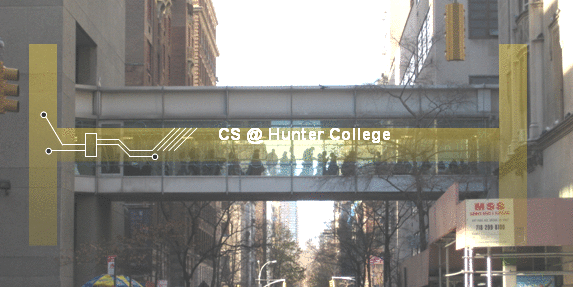
Write a program that asks the user for a name of an image .png file and the name of an output file. The program then converts the image to grayscale and saves the grayscale image to the specified output file.
There are many ways to convert color images to grayscale (see Grayscale Algorithms for a nice overview).
For this program, we are setting each channel of a pixel to its green value. That is, your program should then set the red channel values to the green channel values, as well as the blue channel values to the green channel values. For example, a single pixel at(i,j)of the imageimgwould be changed to:img[i,j,0] = img[i,j,1] #change value of red channel to value of green channel img[i,j,2] = img[i,j,1] #change value of blue channel to value of green channelA sample run of your program should look like:
Enter name of the input file:  csBridge.png
Enter name of the output file:  gray_bridge.png
The sample input file and the resulting grayscale image:

Note: before submitting your program for grading, remove the commands that show the image (i.e. the ones that pop up the graphics window with the image). The program is graded on a server on the cloud and does not have a graphics window, so, the
plt.show()andplt.imshow()commands will give an error. Instead, the files your program produces are compared pixel-by-pixel to the answer to check for correctness.Hint: See Lab 3. Think about how you can uses numpy slices to change every pixel.
-
Due Date: 5pm, Tuesday, March 10
Reading: Burch's Logic & Circuits & Lab 5
Available Libraries: N/ANOR Circuit
Build a circuit that has the same behavior as a nor gate (i.e. true only when all inputs are false) using only and, or, and not gates.
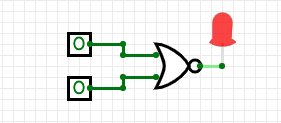
Save your expression to a text file. See Lab 5 for the format for submitting logical expressions to Gradescope.
-
Due Date: 5pm, Wednesday, March 11
Reading: Burch's Logic & Circuits & Lab 5
Available Libraries: N/AMajority Circuit
Write a logical expression that is equivalent to the circuit that computes the majority of 3 inputs, called in1, in2, in3:
- If two or more of the inputs are True, then your expression should evaluate to True.
- Otherwise (two or more of the inputs are False), then your expression should evaluate to False.
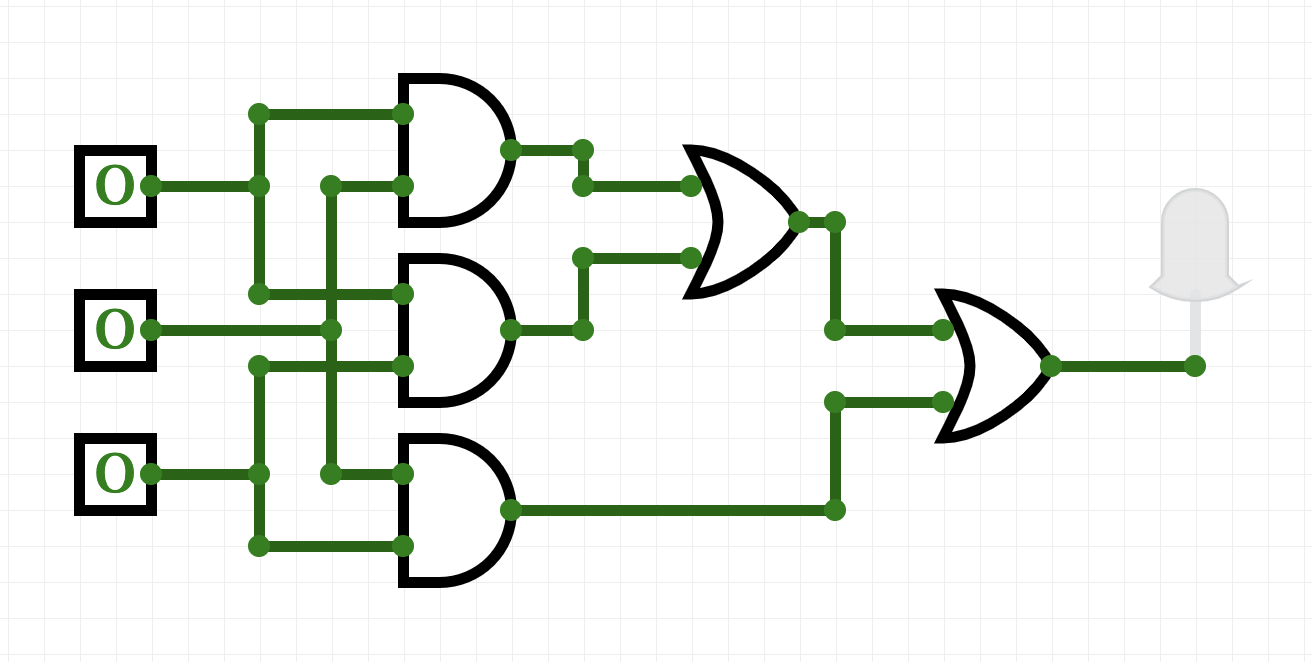
Save your expression to a text file. See Lab 5 for the format for submitting logical expressions to Gradescope.
Hint: See Lab 5.
-
Due Date: 5pm, Thursday, March 12
Reading: Chapter 7 & Lab 4
Available Libraries: turtleTurtle String
- 'F': moves the turtle forward 50 steps
- 'L': turns the turtle 90 degrees to the left
- 'R': turns the turtle 90 degrees to the right
- '^': lifts the pen
- 'v': lowers the pen
- 'T': change the shape to triangle
- 'C': change the shape to circle
- 'c': change the pen color to cyan
- 'o': change the pen color to orange
- 'B': change the pen size to 5 (Big pen)
- 's': change the pen size to 2 (small pen)
- 'S': makes the turtle stamp
-
Due Date: 5pm, Friday, March 13
Reading: Burch's Logic & Circuits & Lab 5
Available Libraries: N/ABinary Number Incrementer
Logical gates can be used to do arithmetic on binary numbers. For example, we can write a logical circuit whose output is one more than the inputted number. Our inputs are in1 and in2 and the outputs are stored in out1, out2, and out3.
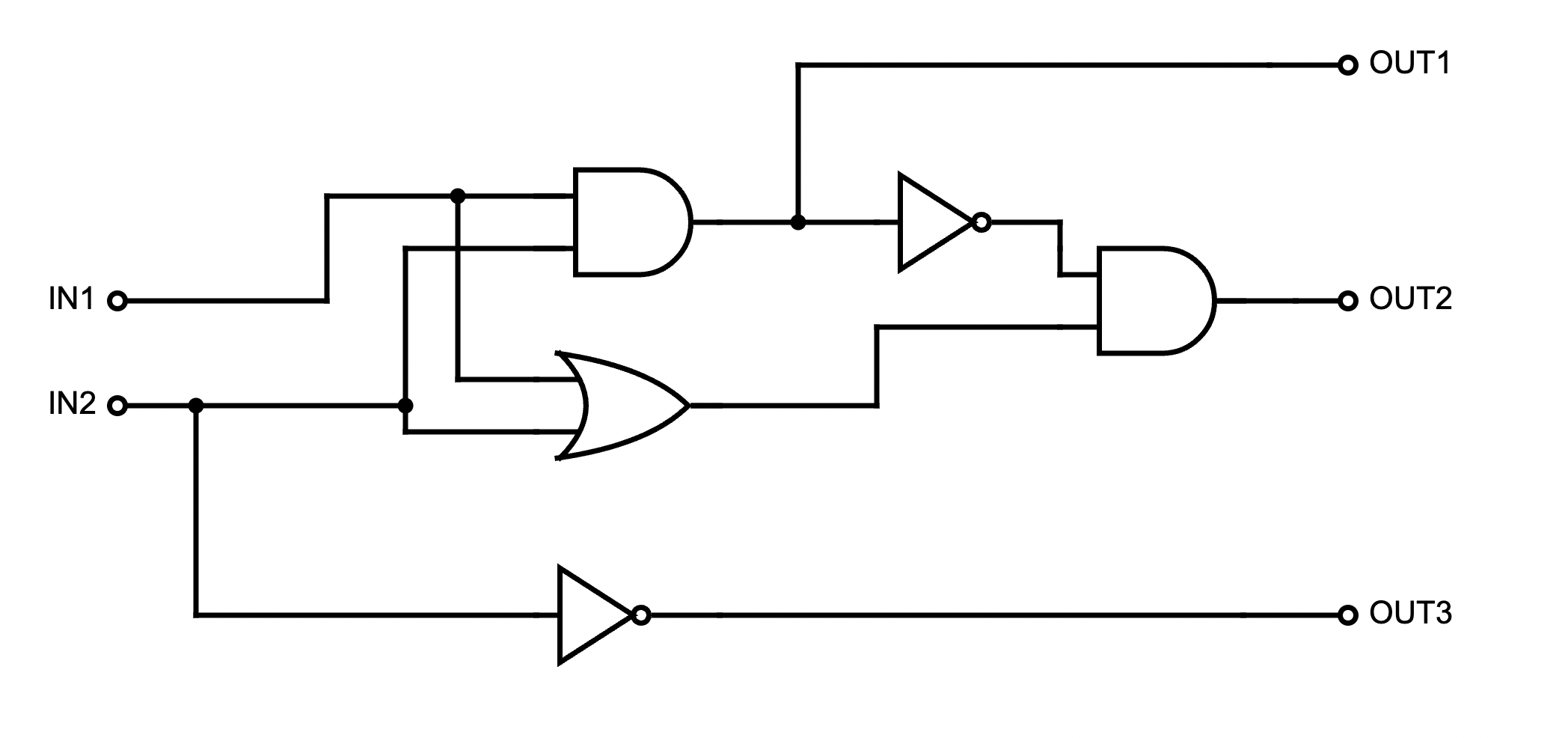
Here is a table of the inputs and outputs:
Inputs Outputs Decimal
Numberin1 in2 Decimal
Numberout1 out2 out3 0 0 0 1 0 0 1 1 0 1 2 0 1 0 2 1 0 3 0 1 1 3 1 1 4 1 0 0 Submit a text file with each of the outputs on a separate line:
"""
Name:  YourNameHere
Date:  March 2025
Logical expressions for a 4-bit incrementer
"""

out1 = ...
out2 = ...
out3 = ...
Where "..." is replaced by your logical expression (see Lab 5 for hints and formatting help).Note: here's a quick review of binary numbers.
-
Due Date: 5pm, Monday, March 16
Reading: Lecture 4, Lab 4
Available Libraries: noneAir Quality Index Alert
Write a program that asks for the Air Quality Index (AQI) value and prints out:
- "Good Air Quality" if the AQI is between 0 and 50 (inclusive),
- "Moderate Air Quality" if the AQI is between 51 and 100 (inclusive),
- "Unhealthy for Sensitive Groups" if the AQI is between 101 and 150 (inclusive),
- "Unhealthy Air Quality" if the AQI is between 151 and 200 (inclusive) and
- "Very Unhealthy Air Quality" if the AQI is above 200.
A sample run:
Enter AQI value: 125
Unhealthy for Sensitive Groups
Note: "inclusive" for a range of numbers means that it includes the endpoints. For example, "between 4 and 8, inclusive" means all values that are greater than or equal to 4 and are also less than or equal to 8.
-
Due Date: 5pm, Tuesday, March 17
Reading: 10-mins to Pandas, DC Pandas, Lab 6
Available Libraries: pandasMinimal Temperatures
In Lab 6, we wrote a program that computed the average rainfall from Australian weather data. Modify the program to ask the user for the name of a CSV file and then to print out, using the data from the CSV file:
- The lowest temperature recorded across all locations and dates.
- The lowest temperature for each location across all dates.
For example, running the program on rain_A.csv (a smaller version of the CSV file from the lab that's contains only the cities that start with 'A'):
Enter CSV file name: rain_A.csv Overall min temp: -5.2 Minimum temperature by location: Location Adelaide 0.7 Albany 1.8 Albury -2.8 AliceSprings -5.2 -
Due Date: 5pm, Wednesday, March 18
Reading: 10-mins to Pandas, DC Pandas, Lab 6
Available Libraries: pandasStore Inventory
Using pandas, write a program that asks the user for a store inventory file, in comma separated value (CSV) format, reads in the corresponding CSV file, calculates a 20% discount on all prices, and prints out the inventory with a new column named Discounted-Price showing the discounted prices. Assume that the CSV files have the columns: "Item", "Price", and "Quantity".
For example if the CSV file, inventory.csv, contained:
Item Price Quantity Laptop 1000.00 5 Mouse 25.00 20 Keyboard 75.00 15 Monitor5 300.00 8 A sample run of your program would be:
Enter inventory file name: inventory.csv
Discounted inventory:
       Item   Price  Quantity  Discounted_Price
0    Laptop  1000.0         5             800.0
1     Mouse    25.0        20              20.0
2  Keyboard    75.0        15              60.0
3   Monitor   300.0         8             240.0
Due Date: 5pm, Thursday, March 19
Reading: GitHub Guide, Lab 6
Available Libraries: N/AGitHub
In Lab 6, you created a GitHub account. Submit a text file with the name of your account. The grading script is expecting a file with the format:
"""
Name:  Your_name
Email: Your_eamil
Account name for my GitHub account
""""

AccountNameGoesHere
Note: it takes a few minutes for a newly created GitHub account to be visible. If you submit to Gradescope and get a message that the account doesn't exist, wait a few minutes and try again.
Due Date: 5pm, Monday, March 23
Reading: Lab 6, Ubuntu Terminal
Available Libraries: N/AHello (Shell Script)
Write a shell script that prints Hello, Shell to the screen.
Submit a single text file containing your Unix shell commands. See Lab 6 for details.
Note: for comments, shell scripts use # in front of lines (instead of the block comments surrounded by """ """) and the first line is the "shebang" line. For a proper shell script, your file should start:
#!/bin/bash
#Name:  YourNameHere
#Email: YourEmailHere
Due Date: 5pm, Tuesday, March 24
Reading: Lab 7 & Section 6.8
Available Libraries: noneHello Two Ways
Write a Python program that contains a function called, main(). Your function should print out a greeting to you by name. For example, if your name is Thomas Hunter, invoking main() would print:
Hello, Thomas HunterYou should use conditional execution, so your file can be run as a standalone program or imported so the function can be used elsewhere.
To test your program, we will run it two ways:
- We will run it as a stand-alone program and see that it outputs the greeting. If your program is called,
student.py, then we would run it,python3 student.py, to see that it prints the greeting. - We will import your file and directly call the function. If your program is called,
student.py, we would import it into a Python program,import student, and in that program, call your function,student.main(), to see that it prints the greeting.
Note: your function MUST be called main()
Hint: See Section 4 of Lab 7 for details on conditional execution.
Due Date: 5pm, Wednesday, March 25
Reading: Think CS Chapter 6, Chapter 7, Lab 5, Lab 8 & Numpy Tutorial
Available Libraries: matplotlib, numpyCounting Red Pixels
Write a function count_red_pixels() that takes the filename of an image and returns the number of pixels where the red channel is the dominant color. A pixel is considered "red-dominant" if its red value is greater than both its green value AND greater than its blue value.
For example, a pixel with RGB values (200, 150, 100) would be counted as red-dominant because 200 > 150 and 200 > 100. However, a pixel with RGB values (200, 250, 100) would not be counted because the green value (250) is greater than the red value (200).An example, using the file red_forest.png as the input file

the following code, using your function:
red_count = count_red_pixels('red_forest.png')
print(red_count)
will output
207278In another example, using the file green_forest.png as the input file

the following code, using your function:
red_count = count_red_pixels('green_forest.png')
print(red_count)
will output
106Note: The grading script does not run the whole program, but instead tests your function separately ('unit tests') to determine correctness. As such, the function name must match exactly (else, the scripts cannot find it). Before submitting your program for grading, remove any commands that are outside a function definition. To test the function you wrote, we import your file and then call the function directly. Code outside of function definitions will give compilation errors and prevents the tests from completing (giving a grade of 0). If you have extra code for testing and such, either comment it out before submitting, or use conditional execution (see Lab 7).
Hint: See Section 2 of Lab 5, Snow Pack in California, for an example of counting pixels.
Due Date: 5pm, Thursday, March 26
Reading: 10-mins to Pandas, DC Pandas, Lab 7
Available Libraries: pandasLibrary Checkout Analysis
The Seattle Public Library provides data on item checkouts. Each row in the dataset represents checkout activity for a specific title during a given month. The dataset includes information about what was checked out (books, movies, music, etc.), how it was checked out (physical vs. digital), who published it, and when.
Adapt the parking ticket program from Lab 7 to analyze library checkout data. Your program should:
- Ask the user for the name of the input CSV file.
- Ask the user for the attribute (column name) to analyze.
- Display the top 5 values for that attribute.
Valid attributes the user may enter:
usageclass- Whether item is Physical or Digitalcheckouttype- The system/vendor used for checkoutmaterialtype- Type of item (book, song, movie, etc.)publisher- Publisher of the itemcheckoutyear- Year of checkout
Use this sample dataset for testing: seattle_library.csv
A sample run:
Enter CSV file name: seattle_library.csv
Enter attribute: materialtype
The top 5 values for materialtype are:
materialtype
BOOK         427
EBOOK        200
SOUNDDISC     99
VIDEODISC     88
SONG          79
Name: count, dtype: int64
And another run:
Enter CSV file name: seattle_library.csv
Enter attribute: usageclass
The top 5 values for usageclass are:
usageclass
Physical    621
Digital     379
Name: count, dtype: int64
And one more run:
Enter CSV file name: seattle_library.csv
TEnter attribute: checkoutyear
The top 5 values for checkoutyear are:
checkoutyear
2016    989
2024     10
2025      1
Name: count, dtype: int64
Due Date: 5pm, Friday, March 27
Reading: Section 6.8 & Lab 7
Available Libraries: turtleRainbow Star
Write a program, using function main() that implements the following pseudocode.
Note: the pseudocode refers to the body of the function and does not illustrate the function definition.""" TODO: implement the following pseudocode inside a main() function: Create a turtle Set the turtle's speed to 0 Set the turtle's pen size to 2 Hide the turtle Create a list with ["red", "cyan", "blue", "orange"] repeated 12 times Create a list with the numbers 20, 22, 24, ..., 114 Zip the two lists For each color and distance in the zipped lists: Set the turtle's color to the current color Move forward by the current distance Turn left 120 degrees Move forward by the current distance again Turn right 65 degrees """Hint: You can repeat a list using *
Example:[1, 2] * 3creates[1, 2, 1, 2, 1, 2]Hint: Use
list(range(start, stop, step))to create a list of numbers
Example:list(range(10, 30, 5))creates[10, 15, 20, 25]Hint: Use zip() to pair elements from two lists together. See Lab 7 Section 2
Your output should look like this:

Due Date: 5pm, Monday, March 30
Reading: Section 7.4, Lab 4, Lab 7 and Lab 8
Available Libraries: noneLetter to GPA
Write the function letter_to_gpa() which takes a string representing a letter grade and returns the corresponding GPA value as a float.
- If the user provides a string that does not correspond to a valid letter grade, your function should return: -1.0
- Valid letter grades are: A, A-, B+, B, B-, C+, C, C-, D+, D, F (case-insensitive).
- Use the following GPA scale:
A: 4.0
A-: 3.7
B+: 3.3
B: 3.0
B-: 2.7
C+: 2.3
C: 2.0
D: 1.0
F: 0.0
A sample call of the function:
print("Converting A- to", letter_to_gpa("A-"))would print:
Converting A- to 3.7And another example call of the function:
grade = "B+"
print("Converting", grade, "to", letter_to_gpa(grade))
would print:
Converting B+ to 3.3Note: The grading script does not run the whole program, but instead tests your function separately ('unit tests') to determine correctness. As such, the function name must match exactly (else, the scripts cannot find it). Before submitting your program for grading, remove any commands that are outside a function definition. To test the function you wrote, we import your file and then call the function directly. Code outside of function definitions will give compilation errors and prevents the tests from completing (giving a grade of 0). If you have extra code for testing and such, either comment it out before submitting, or use conditional execution (see Lab 7).
Hint: See Lecture 8 for related programs.
Due Date: 5pm, Friday, April 10
Reading: Think CS Chapter 6, Lab 4, Lab 8, & Numpy Tutorial
Available Libraries: matplotlib, numpyAveraging Images
Fill in the missing functions:
- average(region): Takes a region of an image and returns the average red, green, and blue values across the region.
- setRegion(region,r,g,b): Takes a region of an image and red, green, and blue values, r, g, b. Sets the region so that all points have red values of r, green values of g, and blue values of b.
The functions are part of a program that averages smaller and smaller regions of an image until the underlying scene is visible (inspired by the elegant koalas to the max).
For example, if you inputted our favorite image, you would see (left to right):






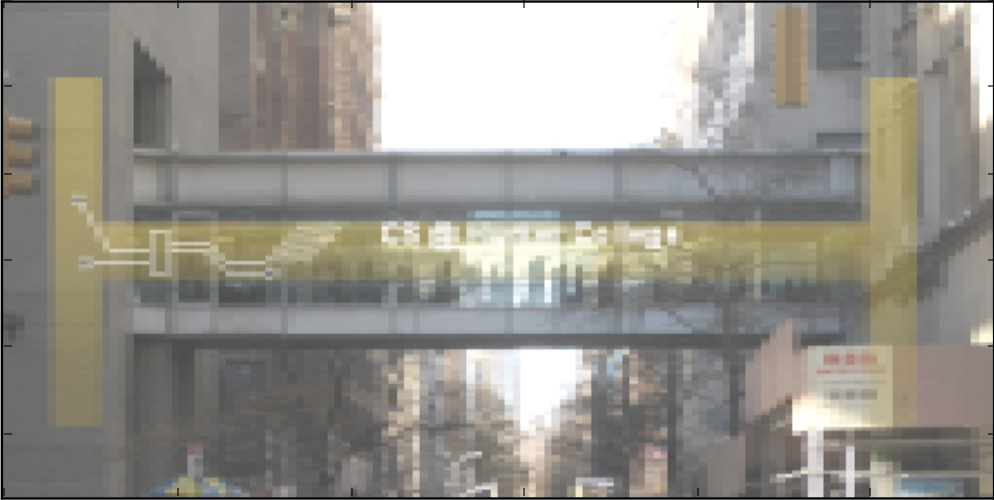
and finally:
A template program, averageImage.py, is available here. You should use this file to get started with your program.
The grading script does not run the whole program, but instead runs each of your functions separately ('unit tests') to determine correctness. As such, the names of the functions must match exactly the ones listed above (else, the scripts cannot find them).
Due Date: 5pm, Monday, April 13
Reading: 10-mins to Pandas, DC Pandas, Lab 6, Lab 7
Available Libraries: pandas, matplotlibWondrous Stars
Write a program that, given the 'Stars' dataset will do the following:
- Ask the user for the name of the input file.
- Ask the user for the name of the column they wish to average (one of Temperature, Luminosity, Radius or Absolute Magnitude)
- Print the average of that column for each star type.
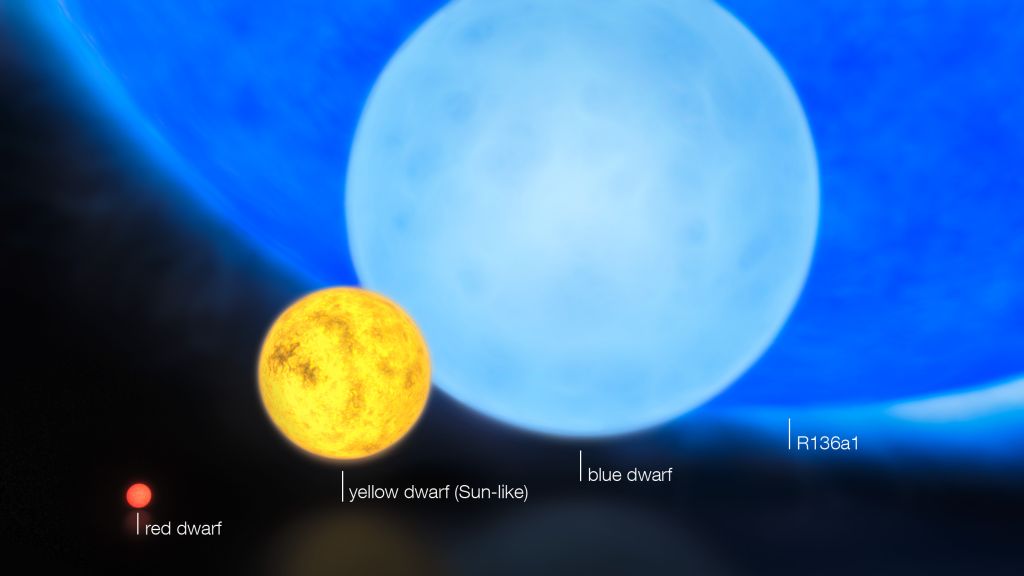
Note: To put the data in perspective, keep in mind that these measures are given as multiples of those of the Sun! (image credits: space.com)
A sample run:
Enter file name: stars.csv
Enter the name of the column
(Temperature, Luminosity, Radius or Absolute Magnitude)
you would like to average: Luminosity

The average Luminosity for each Star type is:
Star type
Brown Dwarf           0.000693
Hypergiant       309246.525000
Main Sequence     32067.386275
Red Dwarf             0.005406
Supergiant       301816.250000
White Dwarf           0.002434
Name: Luminosity, dtype: float64
Another sample run:
Enter file name: stars.csv
Enter the name of the column
(Temperature, Luminosity, Radius or Absolute Magnitude)
you would like to average: Temperature

The average Temperature for each Star type is:
Star type
Brown Dwarf       2997.950
Hypergiant       11405.700
Main Sequence    16018.000
Red Dwarf         3283.825
Supergiant       15347.850
White Dwarf      13931.450
Name: Temperature, dtype: float64
Note: You may assume that input is correct (e.g. only expected columns are entered as input)
Hint: You should use groupby() as described in Lab 6.
Due Date: 5pm, Tuesday, April 14
Reading: Think CS Chapter 6 & Lab 8
Available Libraries: turtlePolygons
Write function polygon, which takes four parameters: a turtle, number of edges, edge length, and color as a string. The functionality of polygon uses turtle object to draw a polygon with number of edges, each edge has edge length, the polygon is in color, where color can be specified in name like "red" or using a hexadecimal representation such as "#00ffff" (green + blue = cyan).
The code of function main to test polygon is as follows:
The above main function produces the following figure.def main(): tess = turtle.Turtle() polygon(tess, 5, 100, "green") polygon(tess, 6, 60, "#ff00ff") polygon(tess, 7, 70, "#ff0000") turtle.done() if __name__ == '__main__': main()
Note: The grading script does not run the whole program, but instead tests your function separately ('unit tests') to determine correctness. As such, the function name must match exactly (else, the scripts cannot find it). Before submitting your program for grading, remove any commands that are outside a function definition. To test the function you wrote, we import your file and then call the function directly. Code outside of function definitions will give compilation errors and prevents the tests from completing (giving a grade of 0). If you have extra code for testing and such, either comment it out before submitting, or use conditional execution (see Lab 7).
Hint: See Lecture 1 for the general recipe for drawing polygons.
Due Date: 5pm, Wednesday , April 15
Reading: Chapter 12 & Lab 8
Available Libraries: noneUnique Entries
When students visit the lab, their EmpID is stored as an 8-digit string. Many students visit multiple times, but we are interested in the total number of unique visitors to the lab. Write a function unique_visitors() that takes a list of 8-digit strings and returns the number of unique strings that occur.
For example:
would print:ids = ['12345678','11223344','12312323','12345678'] print("The number of unique visitors is ", unique_visitors(ids))
since there are 4 entries but the first and fourth entries are duplicates of each other.The number of unique visitors is 3Note: The grading script does not run the whole program, but instead tests your function separately ('unit tests') to determine correctness. As such, the function name must match exactly (else, the scripts cannot find it). Before submitting your program for grading, remove any commands that are outside a function definition. To test the function you wrote, we import your file and then call the function directly. Code outside of function definitions will give compilation errors and prevents the tests from completing (giving a grade of 0). If you have extra code for testing and such, either comment it out before submitting, or use conditional execution (see Lab 7).
Hint: Use a dictionary to store the IDs and return the length of the dictionary.
Due Date: 5pm, Thursday , April 16
Reading: Chapter 12 & Lab 8
Available Libraries: noneMost Common Word
Write a function most_common() that takes a string and returns the word that occurs most often. You may assume that:
- There is exactly one word that occurs most often.
- All punctuation has been removed and words are separated by spaces (' ') and all letters are lower-case.
For example:
would print:phrase = "MORE: The more that you read, the more things you will know. The more that you learn, the more places you'll go. --Dr. Seuss" phrase = phrase.lower() punctuation_list = ['.',',','!','?',':',';','\n','\t','-',' '] for pun in punctuation_list: phrase = phrase.replace(pun,' ') print('Phrase unpunctuated:', phrase) print('Most common word:', most_common(phrase))Phrase unpunctuated: more the more that you read the more things you will know the more that you learn the more places you'll go dr seuss Most common word: moresince 'more' occurs five times in the phrase, more than any other.
Note: The grading script does not run the whole program, but instead tests your function separately ('unit tests') to determine correctness. As such, the function name must match exactly (else, the scripts cannot find it). Before submitting your program for grading, remove any commands that are outside a function definition. To test the function you wrote, we import your file and then call the function directly. Code outside of function definitions will give compilation errors and prevents the tests from completing (giving a grade of 0). If you have extra code for testing and such, either comment it out before submitting, or use conditional execution (see Lab 7).
Hint: Use a dictionary to count how many times you see each name. When you add a name to the dictionary a second time, also append the name to a list of duplicated names.
Due Date: 5pm, Friday, April 17
Reading: Think CS Chapter 6 & Lab 8
Available Libraries: turtleTree Drawing
Write the function
draw_tree()that implements the pseudocode below, using the turtle library:Function draw_tree() Inputs: a turtle, the branch length, the leaf color and the trunk color 1. Change the color to the trunk color. 2. If branch length <= 20 3. Change the color to leaf color. 4. Move forward the branch length. 5. Move backward the branch length. 6. Change the color to trunk color. 7. Else: 8. Move forward 80% of the branch length. 9. Turn 30 degrees to the left. 10. Call the function with 80% of the branch length, and the same turtle & colors. 11. Turn 60 degrees to the right. 12. Call the function with 80% of the branch length, and the same turtle & colors. 13. Turn 30 degrees to the left. 14. Move backward 80% of the branch length.
For example:
tess = turtle.Turtle()
tess.left(90)
tess.pensize(2)
draw_tree(tess,50,"green","brown")
will draw:

While increasing the starting branch length and changing the branch and trunk colors:
tess = turtle.Turtle()
tess.left(90)
tess.pensize(2)
draw_tree(tess,100,"indigo","black")
will draw:
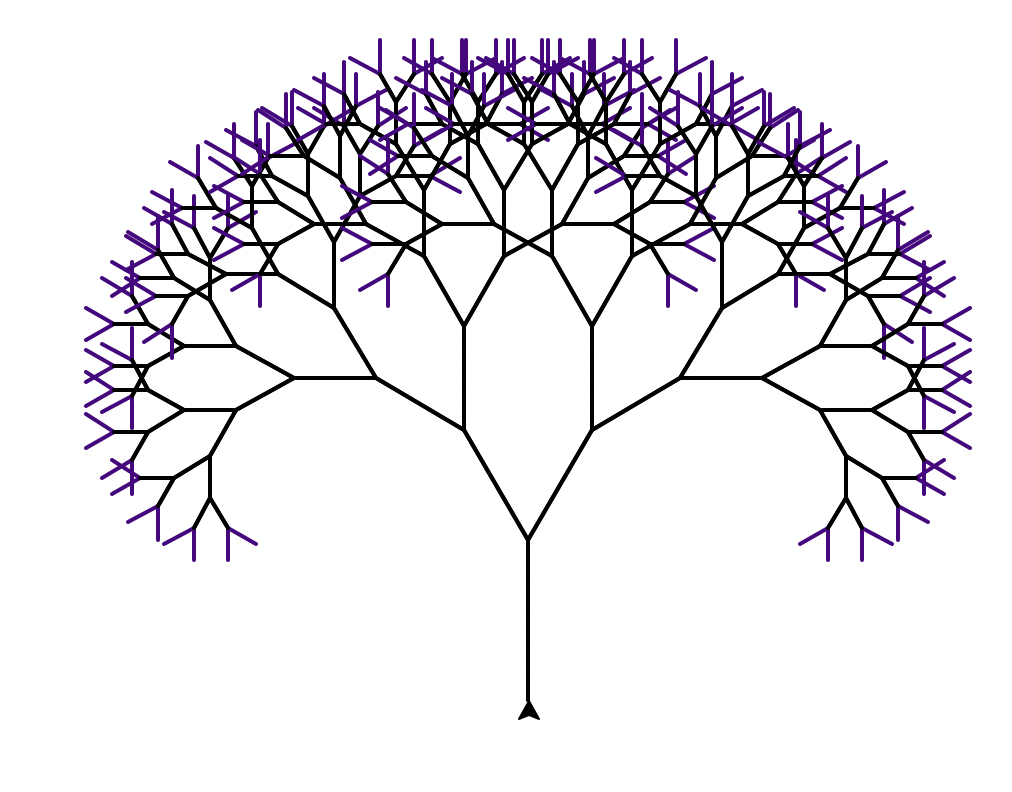
The grading script does not run the whole program, but instead tests your function separately ('unit tests') to determine correctness. As such, the function name and input parameter order must match exactly (else, the scripts cannot find it).
Hint: See Section 4 of Lab 7 for details on conditional execution.
Due Date: 5pm, Monday, April 20
Reading: Lab 9
Available Libraries: noneFinding Errors
Lab 9 works through finding and fixing errors in a Python program. Fix all of the errors in the file errorsRoman.py and then upload the file to Gradescope.
Due Date: 5pm, Tuesday, April 22
Reading: Think CS Chapter 6 & Lab 9
Available Libraries: turtle, pandasHurricane Tracker
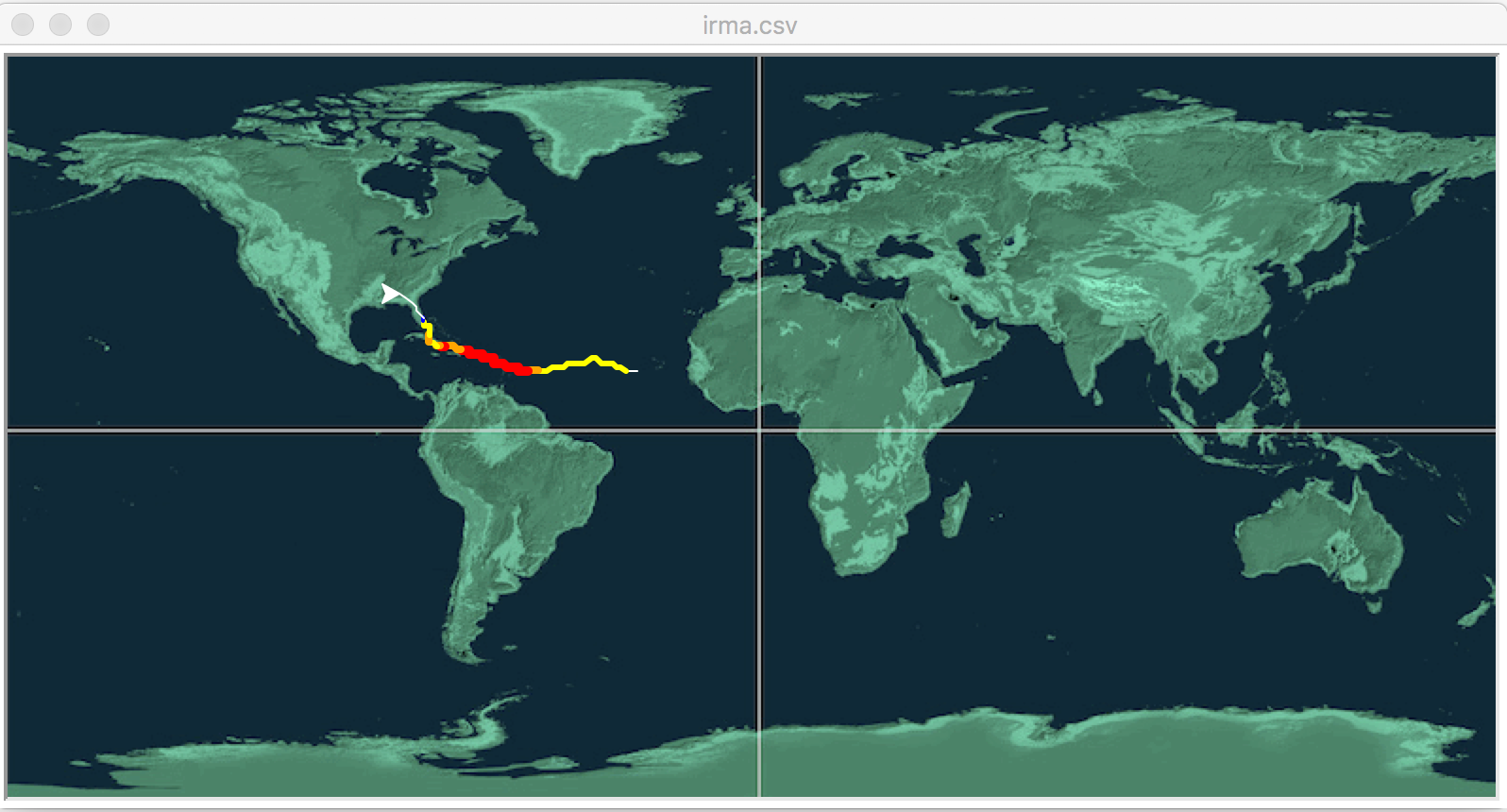
This program asks that you fill in the missing function to animate hurricane data (inspired by the 2018 Nifty Hurricane Program by Phil Ventura). Your function, animate(t,lat,lon,wind) takes as input:
- t: a turtle,
- lat: an integer storing the current latitude,
- lon: an integer storing the current longitude, and
- wind: the current wind speed in miles per hour.
Your function should move to the turtle to the current location (longitude, latitude), and then based on the Saffir-Simpson Hurricane Wind Scale, change the turtle to be:
- red and pen size 5 for Category 5 (windspeed > 157 mph)
- orange and pen size 4 for Category 4 (windspeed in 130-156 mph)
- yellow and pen size 3 for Category 3 (windspeed in 111-129 mph)
- green and pen size 2 for Category 2 (windspeed in 96-110 mph)
- blue and pen size 1 for Category 1 (windspeed in 74-95 mph)
- white and pen size 1 if not hurricane strength
Download the template program, hurricane.py. You will also need to download the background image, mapNASA.gif (link here), and put it in the same directory as hurricane.py.
The grading script does not run the whole program, but instead runs each of your functions separately ('unit tests') to determine correctness. As such, the names of the functions must match exactly the ones listed above (else, the scripts cannot find them).
Two test files (irma.csv and jose.csv) are from the Nifty site. Additional CSV files are available there.
Hint: You may find the following turtle commands useful: color(), goto(), and pensize().
Due Date: 5pm, Thursday, April 23
Reading: 10-mins to Pandas,
DC Pandas, Plotly Maps, Lab 9
Available Libraries: pandas, plotlyQueens Library Branches Map
New York City Open Data makes data for the Queens Library branches publicly available. A sample file, Queens_Library_Branches.csv was downloaded and can be used to test your program.
Using Plotly Express (see Lab 9), write a program that asks the user for the name of a CSV file, name of the output file, and creates a map with markers for all the Queens Library branches from the input file. When the user hovers over the marker, the Neighborhood Tabulation Area (NTA) should appear in the pop-up box.
A sample run:
Enter CSV file name:  Queens_Library_Branches.csv
Enter output file:  libraryMap.html
which would produce the HTML file:
When running your program locally, you need to check that the "Latitude" and "Longitude" values are non-empty. You can drop any row where there's empty values with:
df_cleaned = df.dropna()
Due Date: 5pm, Friday, April 24
Reading: 10-mins to Pandas, DC Pandas, Lab 6 & 8
Available Libraries: pandasAddress DataFrame
Write a function, make_addr_df() that has 3 input parameters:
- last_names: a string containing last names, separated by spaces,
- first_names: a string containing first names, separated by spaces,
- emails: a string containing emails, separated by spaces,
hc_last = "Hunter Raab Kirschner Cantor"
hc_first = "Thomas Jennifer Anne Nancy"
hc_email = "th1870@hunter.cuny.edu jr2001@hunter.cuny.edu ak2023@hunter.cuny.edu nc2024@hunter.cuny.edu"
print(make_addr_df(hc_last, hc_first, hc_email))
will output:
	Last     First                  emails
0     Hunter    Thomas  th1870@hunter.cuny.edu
1       Raab  Jennifer  jr2001@hunter.cuny.edu
2  Kirschner      Anne  ak2023@hunter.cuny.edu
3     Cantor     Nancy  nc2024@hunter.cuny.edu
The grading script does not run the whole program, but instead runs your function separately ('unit tests') to determine correctness. As such, the name of the functions must match exactly the one listed above (else, the scripts cannot find it).
Hint: Use split() to create lists of each category entered. See Lab 8 for creating dataframes with dictionaries.
Due Date: 5pm, Monday, April 27
Reading: Think CS: Chapter 8 & Lab 10
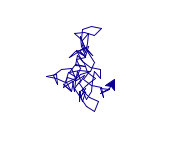
Available Libraries: randomRandom Walk
Modify the program from Lab 10 that makes a turtle walk 250 times. Each "walk" is 5 steps forward and the turtle can turn 0,45,90,135,...315,360 degrees (chosen randomly) at the beginning of each walk.
A sample run of your program:
Due Date: 5pm, Tuesday, April 28
Reading: Think CS: Chapter 8 & Lab 10
Available Libraries: noneValidating Input
Write a program that repeatedly asks the user to enter a valid username.
A username is considered invalid if:
- it has fewer than 4 characters, or
- it exactly matches one of the following reserved words: admin, root, or guest
If the user enters an invalid username, your program should display an error message and prompt the user again.
Once the user enters a valid username, your program should print the accepted username and end.Sample Run
Enter a username (at least 4 characters): bob
Invalid username. Please try again.
Enter a username (at least 4 characters): admin
Invalid username. Please try again.
Enter a username (at least 4 characters): guest
Invalid username. Please try again.
Enter a username (at least 4 characters): falco42
Username accepted: falco42
Due Date: 5pm, Wednesday, April 29
Reading: 10-mins to Pandas, DC Pandas,
Plotly Maps, Lab 9
Available Libraries: pandas, plotlyHousing Map
Using Plotly Express (see Lab 9), write a program that asks the user for the name of a CSV file, choice of unit size, and name of the output file, and creates a map with scaled markers for all the housing of that size from the input file. When the user hovers over the marker, the name of the property, the number of units of that size and the coordinates. The overall title for the map should include the housing type.
The housing data is available from NYC Open Data listing affordable and market rate housing by building location. We created a smaller file, of just 2023 housing units, Affordable_Housing_Production_by_Building_2023.csv.
If the user enters for size:
- 0: use the column: "Studio Units"
- 1: use the column: "1-BR Units"
- 2: use the column: "2-BR Units"
- 3: use the column: "3-BR Units"
- 4: use the column: "4-BR Units"
- 5: use the column: "5-BR Units"
- Otherwise use the column: "6-BR+ Units"
A sample run:
Enter input file: Affordable_Housing_Production_by_Building_2023.csv
Enter number of bedrooms (0 for studio, 1 for one bedroom,...): 2
Enter output file name: two_bed_2023.html
which would produce the HTML file:
Since the data includes all permits, the information for some private residences is not shared (marked 'Confidential' in the "Project Name" column). Since those lack information, drop those rows before plotting:
housing_df = housing_df[ housing_df['Project Name'] != 'Confidential']
Once the user has specified the housing type, you should make sure that you only plot rows that have information about that housing size (e.g. that are not null ). For example, if they are interested in 1 bedroom apartments:df = housing_df[ housing_df["1-BR Units"].notnull() ]
Due Date: 5pm, Thursday, April 30
Reading: Lab 10, Lab 11, & Ubuntu Terminal
Available Libraries: N/ACounting Script
Using Unix shell commands, write a script that counts the number of
.pyfiles in current working directory.Submit a single text file containing your shell commands. See Lab 10.
Note: for comments, shell scripts use # in front of lines (instead of the block comments surrounded by """ """) and the first line is the "shebang" line. For a proper shell script, your file should start:
#!/bin/bash
#Name:  YourNameHere
#Email: YourEmailHere
Due Date: 5pm, Friday, May 1
Reading: Think CS Chapter 9 & Lab 9
Available Libraries: noneDecimal to Binary Converter
Write a function dec2bin() that takes as input a positive integer and returns a string containing the corresponding binary number. Your function should implement the pseudocode:
dec2bin( dec_num ):
1. Set bin_str = "".
2. While dec_num != 0:
3.   Let rem be the remainder of dividing dec_num by 2.
4.   Add rem to the beginning of bin_str.
5.   Let dec_num be dec_num divided by 2 (integer division).
6. Return bin_str.
For example, calling your function:
print("5 in binary is", dec2bin(5))would print:
5 in binary is 101And another example:
num = 15
print(num, "in binary is", dec2bin(num))
would print:
15 in binary is 1111Note: The grading script does not run the whole program, but instead tests your function separately ('unit tests') to determine correctness. As such, the function name must match exactly (else, the scripts cannot find it). Before submitting your program for grading, remove any commands that are outside a function definition. To test the function you wrote, we import your file and then call the function directly. Code outside of function definitions will give compilation errors and prevents the tests from completing (giving a grade of 0). If you have extra code for testing and such, either comment it out before submitting, or use conditional execution (see Lab 7).
Hint: Remember to add a number to a string, you need to cast the number to be a string first: e.g. bin_str = str(rem) + bin_str.
Due Date: 5pm, Monday, May 4
Reading: MIPS Wikibooks & Lab 11
Available Libraries: N/AMachine Language Hi
Write a simplified machine language program that prints: Hi World!
See Lab 11 for details on submitting the simplified machine language programs.
Hint: You may find the following table useful:
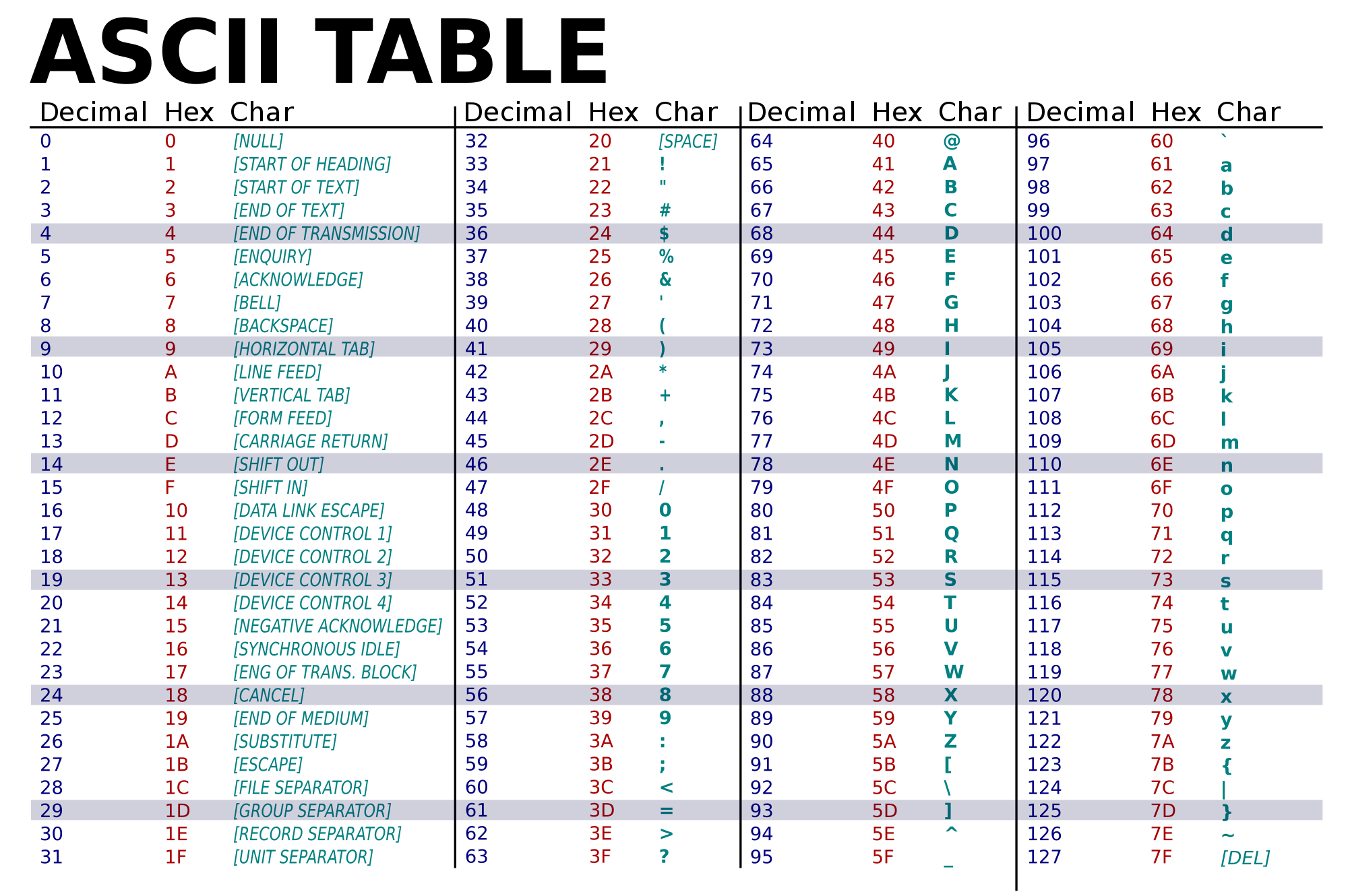
(Image from wikimedia commons)Hint: The grading scripts are matching the phrase exactly, so, you need to include the spacing and punctuation.
Due Date: 5pm, Tuesday, May 5
Reading: MIPS Wikibooks & Lab 11
Available Libraries: N/AMachine Language Loop
Write a simplified machine language program that has register $s0 loop through the numbers 10, 9, 8, ..., 2, 1, 0.
See Lab 11 for details on submitting the simplified machine language programs.
Due Date: 5pm, Wednesday, May 6
Reading: Lab 12
Available Libraries: C++C++ Hello
Write a C++ program that prints "Hello, C++!" and also prints Hello followed by your name. These greetings should be printed on two separate lines to the screen. For example, if your name is
Thomas Hunter, when your program is run, it would print:Hello, C++! Hello, Thomas HunterHint: See Lab 12 for getting started with C++.
Due Date: 5pm, Thursday, May 7
Reading: Lab 4 & Lab 12
Available Libraries: C++Loop Practice
Write a C++ program that asks for the number of repetition, print
Practice makes perfect.that many times.A sample run of your code is as follows.
Enter repetition time: 5
Practice makes perfect.
Practice makes perfect.
Practice makes perfect.
Practice makes perfect.
Practice makes perfect.
Due Date: 5pm, Friday, May 8
Reading: Lab 4 & Lab 12
Available Libraries: C++Temperature Converter
Write a C++ program that converts fahrenheit to celsius. Your program should prompt the user for the temperature in fahrenheit and then print out the corresponding temperature in celsius.
A useful formula: celsius = (5/9)* (fahrenheit - 32).
See Lab 4 for designing Input-Process-Output programs and Lab 12 for getting started with C++.
Due Date: 5pm, Monday, May 11
Reading: Lab 12
Available Libraries: C++Stripes
Write a C++ program program that asks the user for a number and draws stripes of that height and width using 'character graphics'.
A sample run:
Enter a number:  6
+-+-+-
+-+-+-
+-+-+-
+-+-+-
+-+-+-
+-+-+-
Another sample run:
Enter a number:  3
+-+
+-+
+-+
Due Date: 5pm, Tuesday, May 12
Reading: Lab 12 & Lab 13
Available Libraries: C++Credit Classification
Write a C++ program that asks the user for the current number of credit hours and prints
- "freshman" if the given hours is lower than 30.
- "sophomore" if the given hours is at least 30 and less than 61.
- "junior" if the given hours is at least 61 and less than 91.
- "senior" if the given hours is 91 degrees or greater.
A sample run:
Enter number of credit hours taken: 12
freshman
Another sample run:
Enter number of credit hours taken: 96
senior
Due Date: 5pm, Wednesday, May 13
Reading: Lab 12 & Lab 13
Available Libraries: C++Validating Input (C++)
Write a C++ program that asks the user for a year, and continue asking until the number entered that is 2025 or later. Once an appropriate year has been entered, your program should then print the year entered.
A sample run:
Enter year: 2020
Year must be 2025 or later
Enter year: 1990
Year must be 2025 or later
Enter year: 2030
You entered:  2030
Hint: See Lab 10 for similar programs in Python. Rewrite in C++.
Due Date: 5pm, Thursday, May 14
Reading: Lab 12 & Lab 13
Available Libraries: C++Population Growth
Write a complete C++ program that prints the change in population of the the United States:
where p is the population, B is the birth rate of 12.4 births for every 1000 people (12.4/1000) each year, and D is the death rate of 8.4 for every 1000 people (8.4/1000). In 2017, the population of United States was 325.7 million. Your program should ask the user for the number of years and print expected population over those years starting from 2017. Each line should have: the year and the population (in millions).p = p + Bp - DpA sample run:
Please enter the number of years: 10
Year 2017  325.70
Year 2018  327.00
Year 2019  328.31
Year 2020  329.62
Year 2021  330.94
Year 2022  332.27
Year 2023  333.60
Year 2024  334.93
Year 2025  336.27
Year 2026  337.61
Note: if you would like to make the output a bit prettier, you can include the library (
#include <iomanip>) which has a command to limit the number of places after the decimal point printed to 2 before you print:cout << setprecision(2) << fixed;
Due Date: 5pm, Friday, May 15
Reading: Lab 12 & Lab 13
Available Libraries: C++Twos' Complement
Write a C++ program that asks the user for a whole number between -31 and 31 and prints out the number in "two's complement" notation, using the following algorithm:
- Ask the user for a number, n.
- If the number is negative, print a 1 and let x = 32 + n.
- If the number is not negative, print a 0 and let x = n.
- Let b = 16.
- While b > 0.5:
- If x >= b then print 1, otherwise print 0
- Let x be the remainder of dividing x by b.
- Let b be b/2.
- Print a new line ('\n').
A sample run:
would output:Enter a number: 8001000Another run:
would output:Enter a number: -1111111
The program turtleString.py takes a string as input and uses that string to control what the turtle draws on the screen (inspired by code.org's graph paper programming). Currently, the program processes the following commands:

Modify this program to allow the user to also specify with the following symbols:
An example with the new symbols and string CcSLBTFSRsoFCSLFBcSTLFoS would create the image: